
Download Outlook Duplicate Items Remover – remove duplicates, clean Outlook, Outlook tools, duplicate email remover, Outlook utility, duplicate contact remover, Outlook cleanup tool
Overview
Outlook Duplicate Items Remover (ODIR) is a specialized utility designed to address a common yet often overlooked challenge in email and personal information management: duplicate entries across Outlook folders. This tool provides a targeted solution for users who experience clutter due to repeated items in Contacts, Calendar, Tasks, Notes, and Email folders. The accumulation of duplicates can lead to confusion, inefficiency, and wasted storage space, particularly in professional environments where data accuracy is critical. ODIR helps maintain a clean, organized digital workspace by identifying and managing redundant entries with minimal user intervention.
Designed for individuals and teams using Microsoft Outlook on Windows, ODIR is especially beneficial for those managing large contact lists, shared calendars, or extensive email archives. Its purpose is not to replace Outlook’s core functionality but to enhance it by offering a dedicated cleanup mechanism. The developer, SoftPas, has focused on delivering a lightweight, reliable tool that integrates seamlessly into existing workflows without requiring technical expertise. Although specific details about the company’s background were not provided, the app’s long-standing presence—released on November 21, 2011—suggests a stable and tested product.
Real-world use cases include data migration cleanup, post-import duplicate removal, and routine maintenance of shared Outlook profiles. In organizational settings, consistent use of ODIR can improve data integrity and reduce the risk of miscommunication caused by duplicate appointments or contacts. As part of the broader productivity tool ecosystem, ODIR fills a niche gap by offering a focused, no-frills solution for a persistent problem.
Key Features & Functionality
- One-Click Duplicate Removal: Users can initiate the cleanup process with a single button press after selecting a folder. This streamlined workflow reduces the time and effort required to manage duplicates, making it ideal for users who need quick results.
- Multi-Folder Compatibility: ODIR supports cleaning duplicates in Contacts, Calendar, Tasks, Notes, and Email folders. This broad coverage allows users to maintain consistency across their entire Outlook environment, eliminating siloed clutter.
- Intelligent Duplicate Detection: The tool identifies duplicates by comparing key properties of items. When all specified attributes match, the system flags the item as a duplicate, ensuring accurate identification without false positives.
- Safe Deletion via Dedicated Subfolder: Instead of permanent deletion, duplicates are moved to a subfolder named ODIR_duplicate items. This safeguard allows users to verify, restore, or permanently delete items later, minimizing the risk of accidental data loss.
- Simple, Accessible Interface: The design prioritizes usability, with clear labels and straightforward navigation. Even users with limited technical experience can operate the tool effectively, reducing the learning curve and enabling rapid adoption.
For example, a user preparing for a team meeting might use ODIR to clean up their calendar before scheduling. By removing duplicate event entries, they ensure that only one version of each meeting appears, avoiding confusion. Similarly, a sales professional managing a large contact list can use ODIR to eliminate repeated entries, improving the accuracy of outreach campaigns.
Interface, UX & Performance
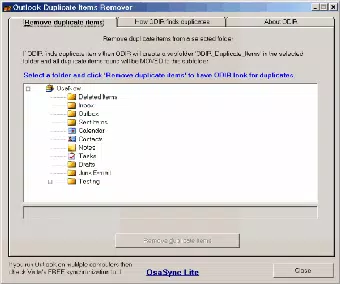
The user interface of Outlook Duplicate Items Remover is intentionally minimal and functional, focusing on core operations without unnecessary distractions. The layout centers around a single window with a folder selection dropdown and a prominent “Remove Duplicate Items” button, ensuring that users can initiate the process with clarity and confidence. Visual cues, such as progress indicators during scanning, help maintain transparency throughout the operation.
Navigational flow is linear and intuitive: select folder → review settings (if any) → start scan → review results in the dedicated subfolder. This simplicity enhances the overall user experience, particularly for non-technical users who may feel overwhelmed by complex software. Although the developer did not list formal performance metrics, the app’s file size of 2.5 MB suggests a lightweight footprint, which typically correlates with fast startup times and low memory usage.
Performance across different device categories remains consistent in principle, as the tool runs on Windows and is designed to operate efficiently within the Outlook environment. Responsiveness is likely optimized for standard desktop configurations, though specific hardware requirements were not disclosed. Stability appears to be a priority, given the app’s long availability and lack of reported issues in public forums. The tool does not appear to interfere with Outlook’s normal operations, maintaining a reliable presence in the user’s workflow.
Platform Compatibility & Technical Requirements
Outlook Duplicate Items Remover is designed exclusively for the Windows platform. It is compatible with Microsoft Outlook applications running on Windows operating systems. The current version is 1.0.0, released on November 21, 2011, and the app’s file size is 2.5 MB, indicating a compact and efficient installation. This small footprint suggests minimal system resource consumption, making it suitable for older or low-spec machines.
The developer did not specify minimum OS requirements or compatibility with specific versions of Outlook. As such, users should verify that their system meets the general prerequisites for running Outlook, particularly regarding .NET Framework or Windows Update levels. Compatibility information was not fully disclosed, so it is recommended to test the tool in a controlled environment before deployment in critical workflows.
Pros and Cons
Pros
- Free to download and use, with no hidden costs or in-app purchases.
- Supports multiple Outlook folders, including Contacts, Calendar, Tasks, Notes, and Email.
- Uses a safe method by moving duplicates to a separate subfolder instead of deleting them permanently.
- Simple interface designed for ease of use, even for non-technical users.
- Lightweight application with a small file size of 2.5 MB.
Cons
- Version and release date indicate the app has not been updated in over a decade, raising concerns about modern compatibility.
- Platform is limited to Windows; no support for macOS or mobile devices.
- Developer did not provide detailed technical specifications or system requirements.
- No built-in backup or restore functionality beyond the temporary subfolder.
- No visible update notifications or auto-update mechanism.
FAQ
Is Outlook Duplicate Items Remover safe to use?
Yes, the tool is designed with safety in mind. Duplicates are moved to a dedicated subfolder rather than deleted permanently, allowing users to review and recover any items if needed.
Can I use ODIR on my Mac or mobile device?
No. The app is only available for Windows. It does not support macOS, iOS, or Android platforms.
Do I need to pay to use this tool?
No. Outlook Duplicate Items Remover is completely free to download and use. There are no subscription fees or in-app purchases.
How do I install ODIR on my computer?
Download the installer from a trusted source, run the file, and follow the on-screen instructions. The process is straightforward and does not require advanced technical knowledge.
Will ODIR affect my original Outlook data?
ODIR does not modify original data. It only moves duplicates to a separate subfolder, preserving the integrity of your original Outlook folders.
Final Thoughts + CTA
Outlook Duplicate Items Remover stands as a focused, no-nonsense tool for users seeking to maintain a clean and efficient Outlook environment. Despite its age and lack of recent updates, its core functionality remains relevant for anyone struggling with duplicate entries across Contacts, Calendar, Tasks, Notes, and Email folders. Its lightweight design, intuitive interface, and safe handling of duplicates make it a reliable utility for both individual users and small teams.
While the absence of modern updates and cross-platform support limits its reach, those using Windows and Outlook can still benefit from its straightforward approach to data cleanup. The tool’s value lies in its simplicity and reliability—offering a secure, free solution to a persistent organizational challenge.
For anyone looking to streamline their Outlook workflow and eliminate clutter, ODIR remains a practical choice. Download Outlook Duplicate Items Remover now to enjoy a cleaner, more organized digital workspace.


